
AI-ready documentation, line by line.
From AI-friendly source authoring to in-output chat backed by your own published documentation. One pipeline, three layers, your documentation answering your users' questions.
The Workflow · 01–03

One single-source engine, from text to AI-ready web help.

ePublisher transforms your complex technical source documents into modern, highly structured web experiences. By mapping formats like FrameMaker, Word, and Markdown++ into an unified content lifecycle, your documentation remains consistently optimized for human readers and LLM discovery engines alike.

ePublisher Designer 01
Configure Stationery

The structural blueprint manager. Design style rules, configure document mappings, and build reusable corporate Stationery templates without manually tampering with the underlying markup.

ePublisher Express 02
Author & Compile

The streamlined workstation interface for technical writing teams. Apply unified, pre-configured Stationery templates directly to content folders to execute flawless local document compilation.

ePublisher AutoMap 03
Automate Builds

The unattended command-line engine. Script your build cycles, coordinate continuous delivery patterns, and wire ePublisher directly into your developer workflows to automate repetitive publishing events.

Layer 01 · The Engine

Three modules. One cohesive ecosystem.

The ePublisher suite coordinates separate functional stages of a shared compiler process, ensuring that formatting rules, author workflows, and automation setups remain entirely uniform.

  • Designer for styling administration and defining master Stationery templates.
  • Express for author-facing local project management and single-pass rendering.
  • AutoMap for server-side scheduling, unattended scripts, and CI/CD task actions.
Explore ePublisher
publishing.md Markdown++
<!--#publishing-intro--> # Publishing Your First Project ePublisher converts your source documents into a fully indexed help system in a single pass. To publish a project: - Open your project in Designer - Select your target from the **Targets** panel - Click **Publish** to generate the output <!--condition:automap--> For scheduled builds, point AutoMap at this project and the output regenerates itself. <!--/condition-->
Layer 02 · Source Agility

Markdown++. Structured text that AI reads fluently.

Markdown++ layers clean text directives over CommonMark patterns to preserve structural attributes like variables, conditionals, and reuse links while preserving plain-text simplicity from edge to edge.

This clear structure provides the clean context layout corporate language models and ingestion pipelines require for accurate indexing. The 1.0 architecture is public under the open MIT license framework.

help.yourdocs.com
Contents
Getting Started
Publishing Your First Project
Targets & Stationery
AI Readiness
Publishing Your First Project
AI-Ready UI Framework
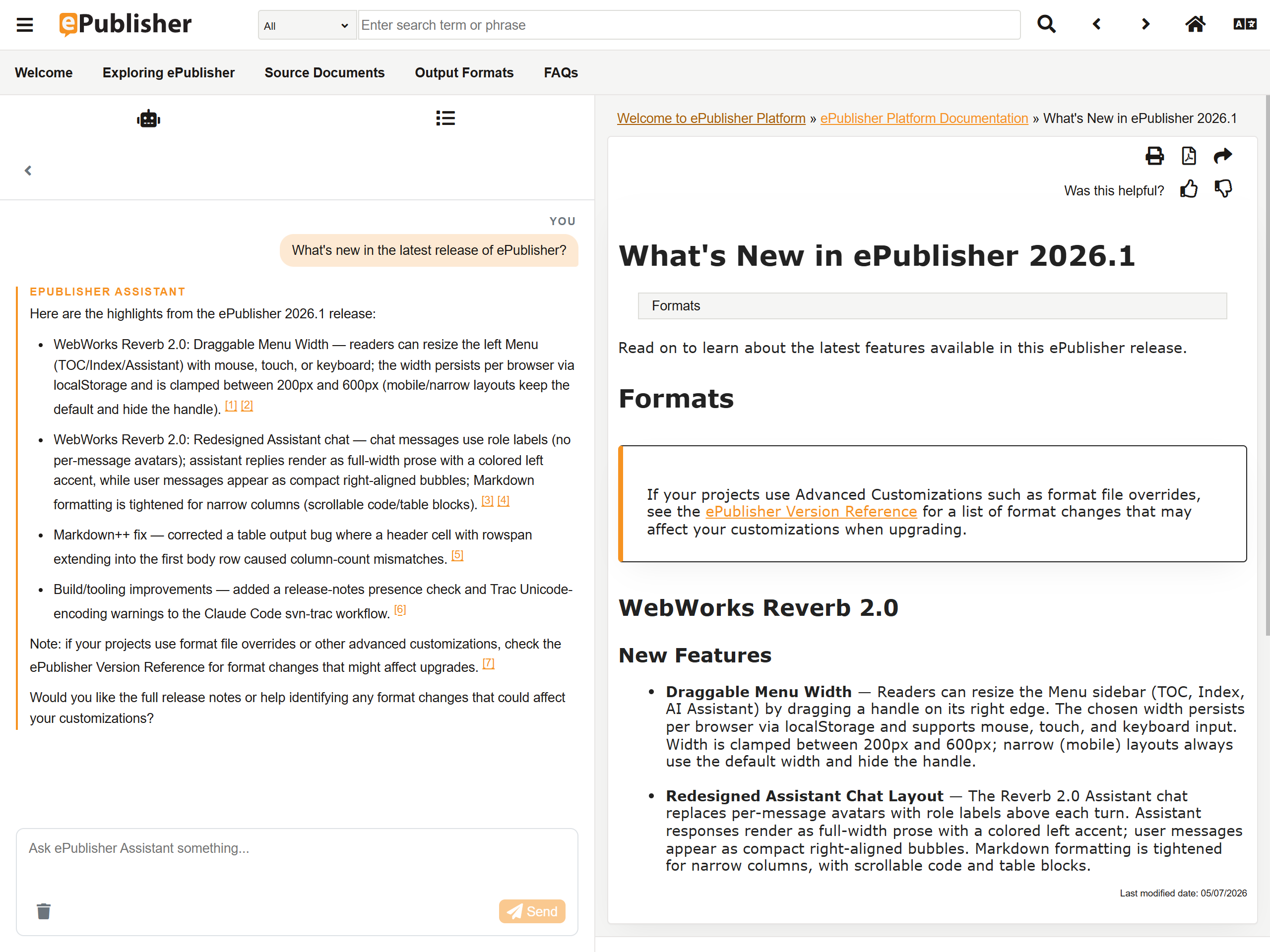
Pre-wired visual shell ready for API chatbot endpoints
Layer 03 · Platform Output

Reverb 2.0. Clean responsive formats, pre-wired for AI.

Reverb 2.0 compiles your source work into accessible, browser-agnostic HTML5 structures optimized with fast client-side indexing and semantic layout tags.

Alongside standard outputs, each build automatically assembles a clean, structured text Knowledge Base archive designed for external ingestion. The UI comes equipped with a conversational module shell, allowing you to easily map your company's chosen custom web help endpoint or enterprise API solution.

  • Accessible static output with full ARIA landmarks requiring no server-side middleware database runtimes.
  • Knowledge Base manifest package built in tandem with every compilation cycle.
  • Pre-built conversational layout module structured to wire seamlessly to your internal search APIs.
  • Sass variables architecture giving engineering teams granular style control.
Flagship · Modern Web
Reverb 2.0

ePublisher's premier digital delivery experience. A responsive HTML5 format offering client-side text searching, deep accessibility parameters, and structured content archives compiled seamlessly from your existing technical authoring documents.

Explore Reverb 2.0
Online Help · Self-Contained
Dynamic HTML

Browser-based online help designed for local application integration, utilizing collapsible navigation, structured indexing, and contextual topic relationships without server runtime configurations.

Explore
Print Fidelity · Paged
PDF (XSL-FO)

High-fidelity paged documents where headers, indexes, page numbering rules, and cross-reference layouts are maintained at the template layer and applied cleanly across all input sources.

Explore
Digital Book · IDPF Standard
ePUB

Standard reflowable e-book containers built for Adobe Digital Editions, Apple Books, and mobile platform reading solutions utilized by off-network operators.

Explore
IDE Help · In-App
Eclipse Help

Contextual embedded documentation assets conforming exactly to the structured XML plugin trees, manifests, and file hierarchies needed inside the Eclipse IDE environment.

Explore
Migration On-Ramp
Markdown++

An exit-ramp out of restricted, binary, or legacy document databases. Compile FrameMaker, Word, or DITA XML files into valid text arrangements without sacrificing original cross-document relationships.

Explore
Established · Compatibility
Legacy formats

Preserve compatibility requirements with stable outputs for HTML Help (CHM), Oracle Help, Sun JavaHelp, and classic WebWorks Help systems from a single layout source.

Explore
The Software · Under the Hood

How ePublisher works across your team.

A closer look at the mechanics: how licenses divide the work, what goes in and what comes out, how builds run themselves, and why the output is safe to host anywhere.
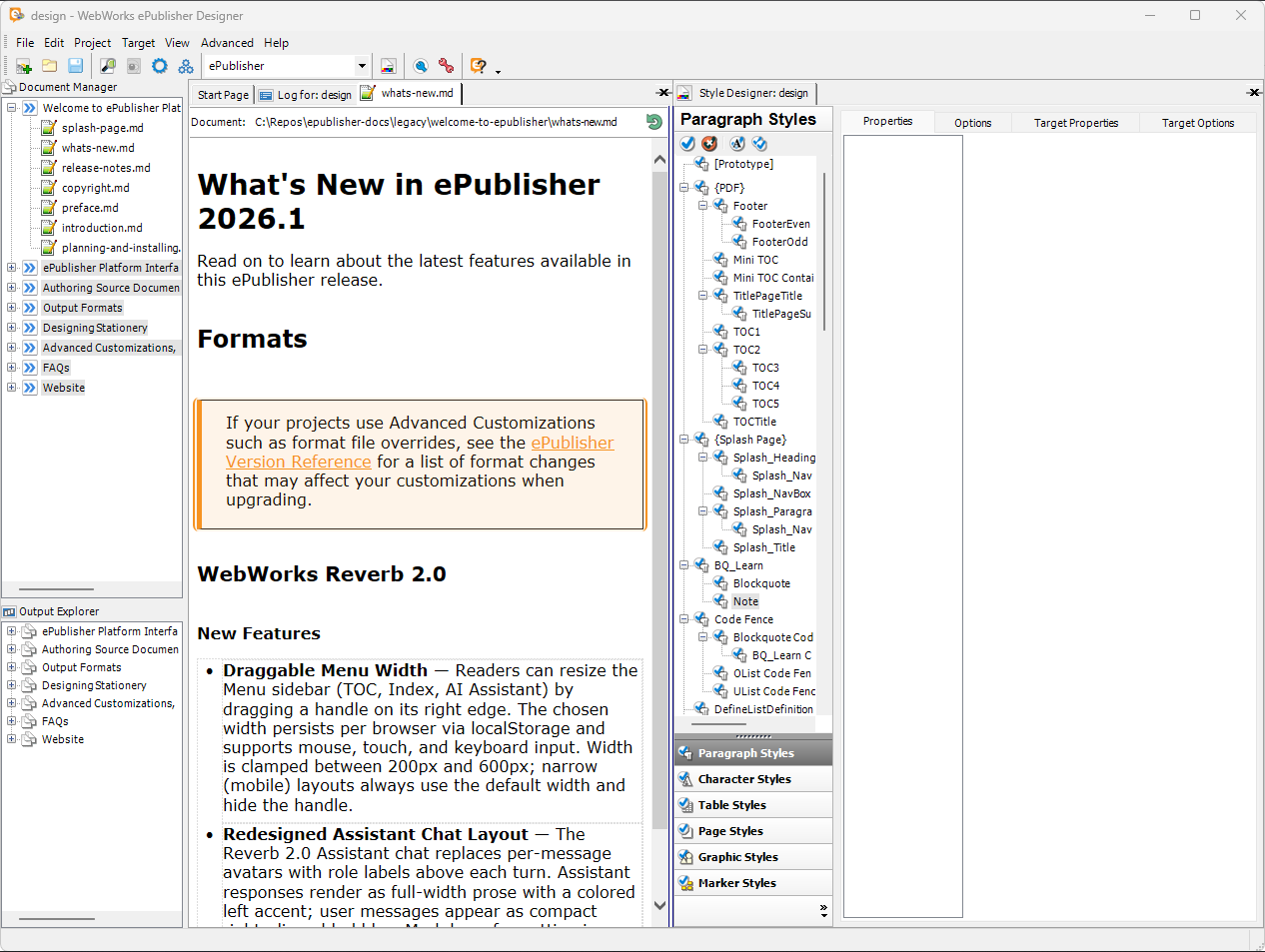
ePublisher Designer — Live Preview
ePublisher Designer live preview
ePublisher Designer · Live preview pane with the project's Stationery applied
01 Core Workflow

One master template. The whole team publishing against it.

ePublisher separates design from production through Stationery — a master template that locks in branding, styling, conditions, and variables. One person owns the look; everyone else just writes.

Designer · Owns the look
The manager

Uses ePublisher Designer to define the Stationery — corporate styling, navigation, output targets — and saves it as the single source of truth.

Express · Compiles safely
The writers

Use ePublisher Express to compile their daily work against that master template — shipping on-brand output every time, with no risk of breaking corporate styling.

02 Entrances & Exits

What you feed it, and exactly what it ships.

Author in the tools your team already uses — or mix all four formats in one project — and generate every deliverable from the same source in a single pass.

Inputs Source Formats
Adobe FrameMaker .fm
Microsoft Word .docx
DITA XML .dita / .ditamap
Markdown++ .md
Outputs Deliverables
Reverb 2.0 HTML5
PDF XSL-FO
ePUB .epub
Eclipse Help in-app
03 Automation · CI/CD

Stop clicking Publish. Let the pipeline do it.

ePublisher AutoMap is the command-line engine. It integrates natively into your existing development pipeline — script it to run silent builds through Git hooks or CI/CD pipelines like GitHub Actions or GitLab CI.

Every time a writer or developer commits a change to the documentation repository, ePublisher automatically rebuilds and deploys the updated Reverb 2.0 help center.

.github/workflows/docs.yml
# On every push to the docs repo automap --project ./help.wrp --target reverb-2 --silent › Compiling 1,240 topics from source… › Generating Knowledge Base archive… ✓ Build complete — Reverb 2.0 deployed
04 Single-Source Conditions

One master project. Many tailored guides.

Manage multiple product variants, user permissions, or software versions from a single master project. With ePublisher's advanced conditional text processing, you apply custom visibility tags to your source files.

At compile time, choose what ships: automatically filter out internal notes, hide administrator-only steps for consumer guides, or generate unique multi-tenant documentation sets — all from the exact same source asset.

Consumer guide hide: internal Admin manual show: admin-only Tenant A show: tenant-a Beta release show: v-next
05 Deployment & Security

Static output. Nothing to exploit.

Reverb 2.0 output is 100% static — plain HTML, CSS, and JavaScript with no server runtime. Host it on any web server, CDN, or internal share, with no portal software to patch.

Because there's no database and no server-side code, the published help is immune to database injections, server-side exploits, and the downtime common to traditional web-help servers. Your IT and security teams get one less thing to worry about.

No database No server runtime Host anywhere CDN-ready
Ready when you are

Get started today!

Bring AI-ready documentation to your team — pick up a license or talk to us about the right fit for your workflow.

Products

Pricing

Support